
Plugin manager and analyzer · Windows
Plugin Freq
Every plugin on your machine, what each one really is, and what it actually does to sound. Find them, switch off the ones you don’t want, and measure the rest on a proper test bench — response, distortion, aliasing, dynamics, null tests and how much CPU they cost. Then listen to it all.
Windows 10/11, 64-bit. One download — the free version is the same application.
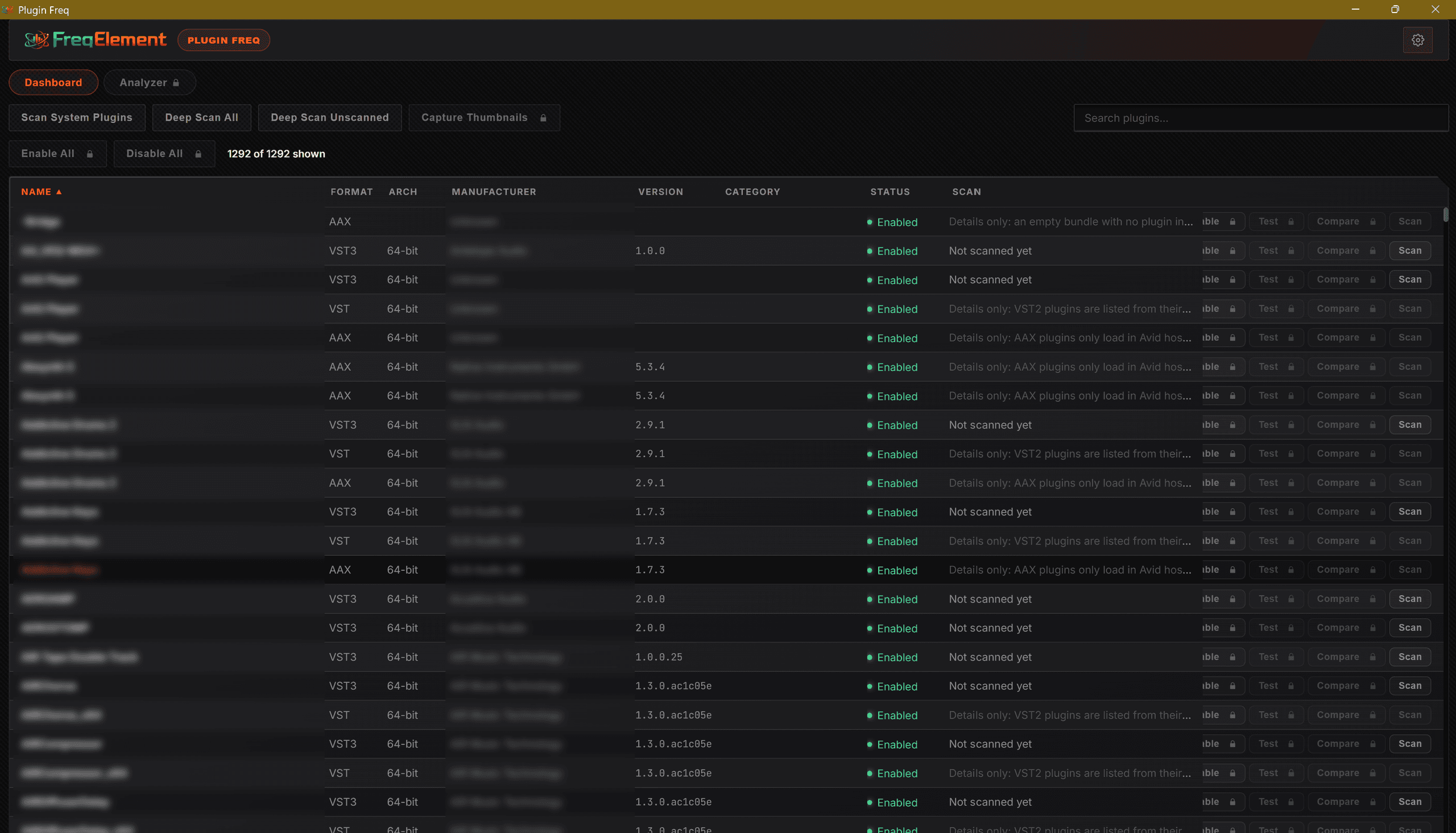
Nothing gets missed
VST3, CLAP, LV2 and VST2, 32-bit and 64-bit, including the ones buried inside a shell. Each plugin is loaded on its own, so what you see is what your DAW sees — and one that misbehaves can’t take the scan down with it.
A tidier plugin list
Turn off the plugins you never reach for and your DAW stops loading them. Nothing is uninstalled and nothing is lost — turn them back on whenever you want them.
Facts, not opinions
Is that EQ really transparent? What does that saturator add, and at what level? Which of these two compressors costs less CPU? Measure it and find out, with the plugin’s own window open beside the graph.
Hear what you measure
Play a tone, a sweep, pink noise, your MIDI keyboard or a live input through the plugin, and turn its controls while the graphs follow. Switch to the dry signal, or to a second plugin, in one click.
Catch it before anyone else does
A null test shows nothing but the difference between two plugins, to the last bit. Robustness checks find the problems that only show up in someone else’s session, and a baseline lists everything a new version changed.
Every angle covered
Aliasing with every folded harmonic labelled, intermodulation, stereo and mono compatibility, decay and RT60, loudness in LUFS, and any figure against a control or across every preset. Export any graph as a picture and its numbers as a spreadsheet.
See it in action
Plugin Freq in 67 seconds: your whole plugin library, the tools that tidy it, and the Analyzer’s test bench at work.
| Feature | Free | Plus | Pro |
|---|---|---|---|
| Find and inspect | |||
| Lists every plugin: VST3, CLAP, LV2, VST2 — 32- and 64-bit | ✓ | ✓ | ✓ |
| Reads each plugin’s real name, maker, version and category | ✓ | ✓ | ✓ |
| Opens up shells into one row per plugin | ✓ | ✓ | ✓ |
| Search and sort the whole list | ✓ | ✓ | ✓ |
| A page of its own for every plugin | ✓ | ✓ | ✓ |
| Add your own folders to search | ✓ | ✓ | ✓ |
| Manage | |||
| Turn plugins off and on without uninstalling | – | ✓ | ✓ |
| Turn a whole folder off or on at once | – | ✓ | ✓ |
| Show only the plugins your DAWs can find | – | ✓ | ✓ |
| A picture of every plugin’s window, to find them by sight | – | ✓ | ✓ |
| Checks for newer versions in the background — any maker | – | ✓ | ✓ |
| Measure | |||
| Frequency and phase response, group delay, impulse | – | – | ✓ |
| Reported latency against real latency | – | – | ✓ |
| THD, THD+N and the harmonic spectrum | – | – | ✓ |
| Distortion against frequency and against level | – | – | ✓ |
| Aliasing, with every folded harmonic labelled | – | – | ✓ |
| Intermodulation distortion, SMPTE and CCIF | – | – | ✓ |
| Compression transfer curve, gain reduction, attack and release | – | – | ✓ |
| Decay and RT60, against the tail the plugin reports | – | – | ✓ |
| Stereo balance, mono compatibility and crosstalk | – | – | ✓ |
| Loudness in and out, in LUFS | – | – | ✓ |
| CPU cost at every buffer size from 32 to 2048 | – | – | ✓ |
| Follows the plugin live as you move its controls | – | – | ✓ |
| Two plugins compared side by side | – | – | ✓ |
| Null test: nothing but the difference between two plugins | – | – | ✓ |
| Robustness checks: buffer sizes, sample rates, saved state, invalid output | – | – | ✓ |
| Any figure against a control, or across every preset | – | – | ✓ |
| Baselines that list everything a new version changed | – | – | ✓ |
| Listen and export | |||
| Play tones, sweeps, noise, MIDI or a live input through the plugin | – | – | ✓ |
| Switch to the dry signal or a second plugin in one click | – | – | ✓ |
| Stretch plugin windows that open too small on high-resolution screens | – | – | ✓ |
| Export graphs as pictures and their numbers as spreadsheets | – | – | ✓ |
| Measure any plugin file from the command line, as JSON | – | – | ✓ |
Plus
$25$19
with code LAUNCH-PLUS
Everything in Free, and the tools that change things: turning plugins off and on, window pictures, and update checks in the background.
Pro Everything
$59$39
with code LAUNCH-PRO
Everything in Plus, and the Analyzer — response, distortion, aliasing, dynamics, null tests and performance, live and side by side — with Listen and the command line.
Free
$0
Every plugin you have, listed and inspected — formats, makers, versions and a page for each.
Get It FreeUpgrading from Plus? You only ever pay the difference: what you paid for Plus comes off the price of Pro automatically at checkout. Sign in to see your upgrade price.
Frequently Asked Questions
Does Plugin Freq support CLAP plugins?
Yes, Plugin Freq lists and analyzes VST3, CLAP, LV2, and VST2 plugins in both 32-bit and 64-bit formats.
Can I use Plugin Freq to disable plugins I don't need?
Yes, the Plus and Pro versions allow you to turn plugins (or entire folders) off and on without uninstalling them, preventing your DAW from loading them.
Will scanning crash Plugin Freq if a plugin misbehaves?
No. Each plugin is loaded independently in its own separate process. If a plugin misbehaves or crashes, it cannot take down the main scan.
Is there a Mac version available?
Currently, Plugin Freq is available exclusively for Windows 10 and Windows 11 (64-bit).
Can Plugin Freq measure aliasing, and show what oversampling does?
Yes. Pro sends a high tone through the plugin and shows every harmonic that folds back into the audible range, labelled with the harmonic it came from, and can sweep the whole range as a spectrogram. Measure with oversampling off and on to see what each setting buys you.
Can I check whether two plugins, or two versions of one, sound the same?
Yes. The null test plays the same noise through both and shows only what’s left once one is taken from the other, against frequency and over time. Nothing left means they are identical to the last bit. A baseline does the same for a new version against a saved measurement of the old one.
Can I listen to a plugin while I measure it?
Yes. Listen plays a tone, a sweep, pink noise, your MIDI keyboard or a live input through the plugin and out of your speakers. Playback starts quietly and never goes above a safe ceiling, however loud the plugin gets.
What does the free version include?
Free lists and inspects every plugin you have — formats, makers, versions and a page for each. Every Plus and Pro control is shown with a padlock, so you can see what it does before deciding. It is the same download as Plus and Pro, and an upgrade unlocks without reinstalling.
// Subscribe
Get early access, private builds, and exclusive launch offers.